
- Home
- CRM Software
- Capsule CRM

Capsule CRM Review



What is Capsule CRM?
Capsule is a simple, flexible, and effective web-based CRM tool you can use for your small business. Capsule is a good tool to keep track of your contacts and companies you do business with, communications with them, sales opportunities, and what activities and tasks that need be done.
With Capsule you can manage all relationships, not just customers: manage contacts, leads, customers, vendors, and more.
Capsule allows you to manage your sales pipeline: track deals, bids, proposals as well as other opportunities.
Emails are easily organized in Capsule, including notes, conversations, and documents. You can have a complete history of various business files in one place.
Share tasks with your team using Capsule. Capsule also lets you manage your projects by creating and monitoring tasks, assigning them to your co-workers, and controlling all the deadlines and milestones. You can also use the application to customize information about your customers and contacts.
It is also available on mobile platforms via tablets and smartphones.
Show More
Overview of Capsule CRM Benefits
Read on to learn about the numerous Capsule CRM benefits:
Capsule allows you to have a complete contact management program by storing and organizing information about your customers and contacts, including tasks and to-do lists. You can also create custom categories for various data about your contacts. Keeping track of the people, organizations, and companies that you do business with is easier with Capsule.
Data about your contacts can easily be shared with your team or the entire company using Capsule. You can import contacts from Outlook, Gmail, vCard, spreadsheets and any CSV file into Capsule. Additional information such as notes about communications with contacts, meeting outcomes, among others, can easily be added in the file.
Capsule also gives you a quick summary of opportunities via the sales dashboard. You can keep track of the various opportunities and milestones that are linked with a success factor which you can use to forecast potential sales revenues.
With Capsule, you can generate reports and extracts from the pipeline using configurable filters.
Capsule’s servers are hosted in Amazon’s data centers, assuring your data is safe and secure. In addition, information that passes between your computer and our servers is encrypted using a technology called SSL, the same technology that banks use to protect data.
With Capsule, your data is stored to multiple locations in real time, and in addition Capsule also makes a further backup of your data every hour.
There is no software to install with Capsule, and because you access it online you are always using the latest version.
Capsule can be integrated with other popular business software such as: Xero, FreshBooks, Zendesk, Mailchimp, among others.
Show MoreOverview of Capsule CRM Features
- Complete and easy contact management
- Efficient sales management
- Track bids, deals, proposals and other opportunities
- Dashboard opportunities overview
- Adding milestones
- Linking milestones with a success factor
- Includes a standard set of milestones
- Easy to-do list and calendar management
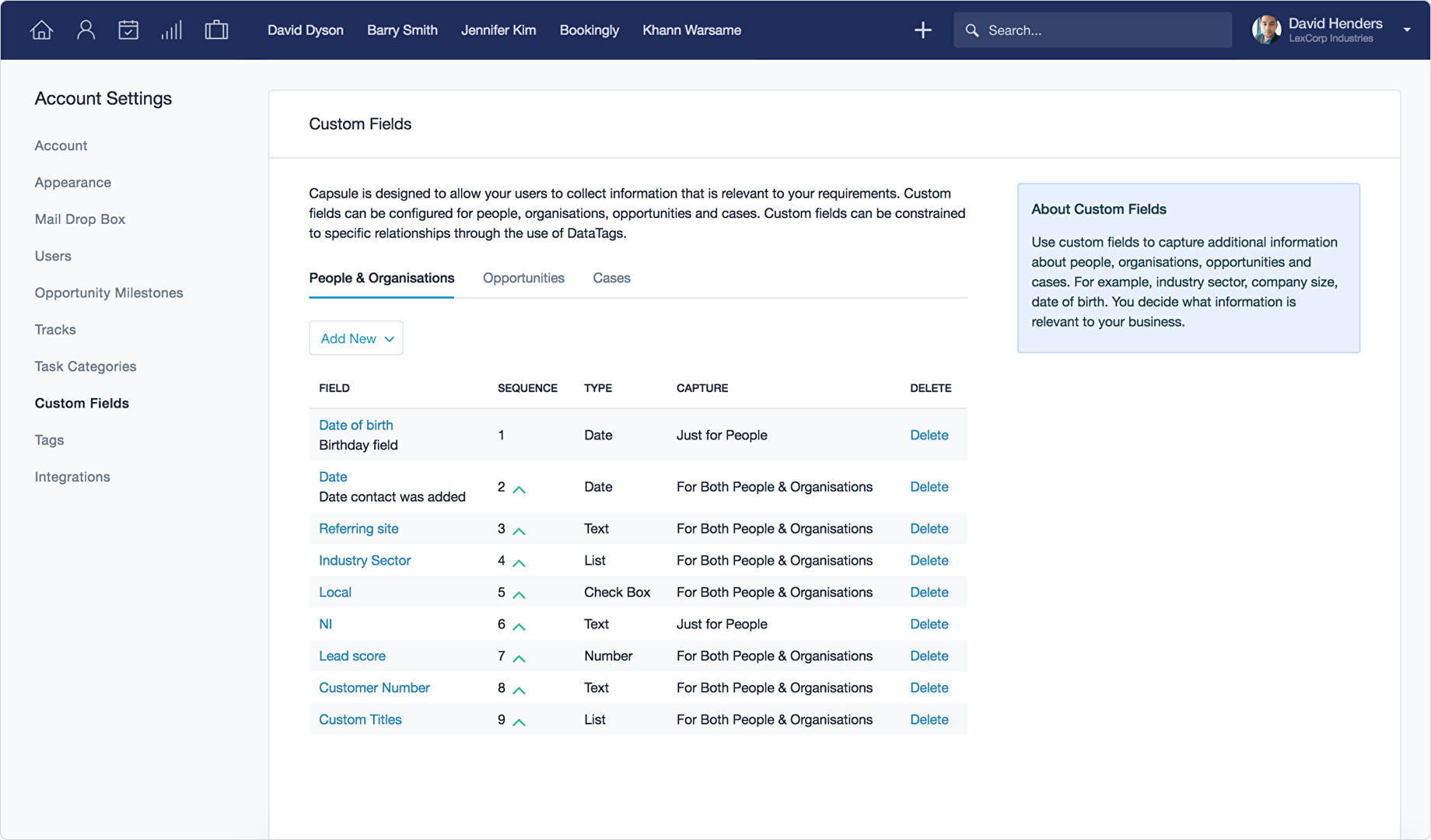
- Easy customization of information categories to fit your business
- Secure access of your account from anywhere
- Easy sharing of contacts with co-workers to assure the entire team has a single up-to-date view of the contact
- Tracking of all email communications into Capsule
- Quick document management, making it easy to attach documents and other files
- Integration of contacts from Outlook, Gmail, vCard, spreadsheets and any CSV file
- Easy creation and analysis of reports
- Customization of the sales milestones and process
- Management groups of contacts with lists using tags
- Easy addition of notes and other information about the contact
- Serious data security
- Controlled access
- Multiple backup
- One master copy of your data on secure servers
- Automatic upgrades
- Compatible with Windows, Mac, or Linux
- Brand your Capsule account using your colors and logo
Capsule CRM Position In Our Categories
Bearing in mind companies have distinct business-related requirements, it is wise they avoid adopting an all-encompassing, “perfect” software product. Be that as it may, it is troublesome to come across such a software solution even among popular software solutions. The sensible thing to do is to write the varied important functions which require examination like critical features, packages, technical skill competence of staff members, organizational size, etc. Next, you must double down on your product research thoroughly. Browse through some of these Capsule CRM evaluations and look into the other applications in your shortlist in detail. Such comprehensive research guarantees you stay away from unfit software products and subscribe to the one which meets all the tools your company requires.
Position of Capsule CRM in our main categories:
TOP
200
Capsule CRM is one of the top 200 CRM Software products
Organizations have diverse needs and requirements and no software application can be perfect in such a scenario. It is useless to try to find an ideal out-of-the-box software product that fulfills all your business requirements. The smart thing to do would be to customize the application for your specific wants, staff member skill levels, budget, and other factors. For these reasons, do not hasten and pay for well-publicized leading systems. Though these may be widely used, they may not be the perfect fit for your unique needs. Do your research, investigate each short-listed platform in detail, read a few Capsule CRM CRM Software reviews, speak to the maker for clarifications, and finally select the app that presents what you want.
How Much Does Capsule CRM Cost?
Capsule CRM Pricing Plans:
Free Trial
Free
Free
Starter
$18/month per user
Growth
$36/month per user
Advanced
$54/month per user
Ultimate
$72/month per user
What are Capsule CRM pricing details?
Capsule CRM Pricing Plans:
Free Trial
Free
Free
Starter
$18/month per user
Growth
$36/month per user
Advanced
$54/month per user
Ultimate
$72/month per user
Capsule offers a flexible, pay-as-you go service. There are four paid plans offered and a free version. All paid plans offer a free 14-day trial:
Free
- Up to 2 users
- 10MB storage
- 250 contacts
Starter –
$18 per user/month
- 14-day free trial
- 10GB storage per user
- 30,000 contacts
- 1 Sales Pipeline
- 1 Project Board
- 50 Custom Fields
- 5 Email Templates
- 1 Shared Mailbox
- 10 AI Content Assists
- Unlimited Sales Opportunities, Projects & Tracks
- Activity reporting
- Key integrations including Microsoft 365, Google, Xero, QuickBooks, Mailchimp, Zapier & many more
Growth
–
$36 per user/month
Everything in Starter, plus:
- 14-day free trial
- 20GB storage per user
- 60,000 contacts
- 5 Sales Pipelines
- Workflow Automation
- 5 Project Boards
- 50 Email Templates
- 150 Custom Fields
- 3 Shared Mailboxes
- 1000 AI Content Assists
- Important Fields
- User Roles & Permissions
- Activity reporting & custom activity types
- Advanced Sales Reporting
- Reporting by team
- Sales forecasting
- Custom reports with Google Looker Studio
Advanced
– $54 per user/month
Everything in Growth, plus:
- 120,000 Contacts
- 30GB Storage per User
- 500 Email Templates
- 50 Sales Pipelines
- 50 Project Boards
- 300 Custom Fields
- 5 Shared Mailboxes
Ultimate
– $72 per user/month
- 240,000 Contacts
- 50GB Storage per User
- 100 Sales Pipelines
- 100 Project Boards
- Unlimited Custom Fields
- 1000 Email Templates
- 10 Shared Mailboxes
- Implementation Support
- Import Assistance
- Custom Training
- Dedicated Account Manager
- Ongoing Priority Support
User Satisfaction
Positive Social Media Mentions
0
Negative Social Media Mentions
0
We are aware that when you decide to get a CRM Software it’s vital not only to find out how experts rank it in their reviews, but also to check whether the actual users and enterprises that use it are indeed satisfied with the service. That’s why we’ve created our behavior-based Customer Satisfaction Algorithm™ that gathers customer reviews, comments and Capsule CRM reviews across a vast range of social media sites. The information is then displayed in a simple to digest way showing how many clients had positive and negative experience with Capsule CRM. With that information at hand you should be equipped to make an informed buying choice that you won’t regret.
Screenshots





Technical details
Devices Supported
- Windows
- Linux
- Android
- iPhone/iPad
- Mac
- Web-based
- Windows Mobile
Deployment
- Cloud Hosted
Language Support
- English
Pricing Model
- Free
- Monthly payment
Customer Types
- Small Business
- Medium Business
- Freelancers
What Support Does This Vendor Offer?
- phone
- live support
- training
- tickets
What integrations are available for Capsule CRM?
Official Mobile App
- Capsule Mobile
Contacts
- Google Contacts
Contracts & proposals
- FormStack
- NiftyQuoter
- Quotient
- Tidy Build
- Better Proposals
Customer Success
- Akita
Marketing & Email Marketing
- Transpond
- MailChimp
- Leadinfo
Google integrations
- Gmail
- Google Calendar
- Google Contacts
- Google Data Studio Connector
- Google Workspace SSO
Help desk
- Zendesk
- Help Scout
- Enchant
Integration platforms
- Zapier
- Flow XO
- Cyclr
- LeadsBridge
- ZapUp
- Make
- Zoho Flow
- Integrately
Inventory management
- Cin7
- DEAR Systems
Invoicing & Accounting
- QuickBooks Online
- Xero
- KashFlow
- FreeAgent
- FreshBooks
- Sage Business Cloud Accounting (UK)
- Paycove
Job & time tracking
- Toggl
- Clockify
- Tidy Work
Migration services
- Trujay
Office Management
- Office R&D
Project Management
- Tidy Enterprise
Telephone & VoIP
- Kixie
- Invoco
- CircleLoop
- Yay
- SwitchboardFree
Website chat
- Reve
- Userlike
Website forms
- Wufoo Forms
- Ninjaforms
- Gravity Forms
Want to develop your own integration?
Capsule’s RESTful API can be used by developers to create clever add-ons or to integrate Capsule with other applications.
Capsule CRM User Reviews
Capsule CRM average rating:
5/5
Overall impression
5/5
Customer Support
5/5
Value for Money
5/5
Ease of Use
Write your own review of this product
ADD A REVIEWThe most favorable review

PROS: Capsule has great set of features and powerful integration with Google App. Features I like most are contact management, tracking features like (making calls, mails, arranging meetings), selling and creating workflow and even the reporting feature that has great ROI, income and seeling options. In addition, there are great integrations with social networks, mails and services.
CONS: I don’t have dislikes about this system, everything works great.
The least favorable review
PROS: I like that I can add custom fields and to measute against those fields. With it I can easily manage employee progress and workflows, and move items through the pipeline.
CONS: They could improive the reporting interface because in order to get a report I need to export data to a spreadsheet and to create own. The process is time consuming and unnecessary.
More reviews from 9 actual users:
Sort by:
Latest
- Latest
- Most useful
- Most positive
- Most negative
Capsule helps me to keep things simple
Read full review >
5/5
Overall impression
5/5
Customer Support
5/5
Value for Money
5/5
Ease of Use
Published on: 19.10.2021
Company Size: 11-50 Employees
Industry: Information Technology Service
PROS: Capsule provides us with powerful features and the integration with Google App is very useful. Also, this app provides us with wonderful features, such as: Contact management, feature for event management and tracking (making calls, mails, arrange meetings), Selling and creating partnership workflow. The reporting features provides us with ROI, income and selling options. In addition, we love Capsule integration with social networks and services and emails. The mobile support works great.
CONS: I need to use the calendar view feature more productively.
CRM system that helps us to stay in touch with our leads
Read full review >
5/5
Overall impression
5/5
Customer Support
5/5
Value for Money
5/5
Ease of Use
Published on: 24.09.2021
Company Size: 11-50 Employees
Industry: Computer Software
PROS: Capsule is simple and easy to use, it allows us to create contacts, relationships and companies and to track all our contacts and their current work place. We can add notes, reminders and track items so we can stay in touch with our partners, customers and leads. It integrates well with HelDesk Software and email marketing automation.
CONS: They need to improve the search engine, it has some issues and bugs because when I want to add country the software thinks that I want to remove some categories.
Great customization tool
Read full review >
4/5
Overall impression
4/5
Customer Support
4/5
Value for Money
4/5
Ease of Use
Published on: 31.08.2021
Company Size: More than 100 Employees
Industry: Internet
PROS: Capsule helps me to add custom fields and I am able to measure against those fields. I can easily manage my employee progress. I can even move items through the pipeline effortlessly.
CONS: I would like to see better reporting interface. To get a report I need to export data to a spreadsheet and to create my own. I don’t like this process at all.
Great CRM helps us to keep in touch with our contacts
Read full review >
5/5
Overall impression
5/5
Customer Support
5/5
Value for Money
5/5
Ease of Use
Published on: 14.06.2021
Company Size: 11-50 Employees
Industry: Computer Software
PROS: The software is easy to use and clear. Capsule allows you to create contacts, relationships and companies so you can easily track you contacts and where they work. Also, my team can add notes, tasks, reminders, follow up items so we can easily stay in touch with our partners, leads and customers. Capsule integrates well with our HelpDesk software and email marketing automation.
CONS: They need to work on their search engine, because whenever I want to search contact in UK and to add people in UK and France for e.g. The search feature won’t work. I would like to create list of three countries and export them into 1 csv, but the software responds like I want to remove categories to search for people. Later, we received a brief explanation how and when they plan to make changes.
Intuitive and easy to use CRM
Read full review >
5/5
Overall impression
5/5
Customer Support
5/5
Value for Money
5/5
Ease of Use
Published on: 26.05.2021
Company Size: More than 100 Employees
Industry: Marketing and Advertising
PROS: It’s easy to implement and the Capsule’s interface is very flexible. You can implement in different department with different customer management processes, you can set up this software easily.
CONS: I would like more detailed guide. To run this software you need some experience of CRM, but the Capsule is not very difficult.
Highly helpful solution for our business
Read full review >
4/5
Overall impression
4/5
Customer Support
4/5
Value for Money
4/5
Ease of Use
Published on: 03.03.2021
Company Size: More than 100 Employees
Industry: Internet
PROS: I like that I can add custom fields and to measute against those fields. With it I can easily manage employee progress and workflows, and move items through the pipeline.
CONS: They could improive the reporting interface because in order to get a report I need to export data to a spreadsheet and to create own. The process is time consuming and unnecessary.
It needs some improvements but it is highly functional for our businesses
Read full review >
5/5
Overall impression
5/5
Customer Support
5/5
Value for Money
5/5
Ease of Use
Published on: 05.02.2018
Company Size: 1-10 Employees
Industry: Information Technology Service
PROS: I like that within Capsule I can create detailed customer databse for each contact and company with thorough profile. I can contact them through email and import contacts from previous systems.
CONS: They could make the software more automatic, there are still some things that we have to do manually. Also, i’d like to see feature that would allow me to export and re-import contacts by using contact’S ID, a feature to spot and correct duplicate entries, more features for its search engine.
With Capsule all things are simple
Read full review >
5/5
Overall impression
5/5
Customer Support
5/5
Value for Money
5/5
Ease of Use
Published on: 31.01.2018
Company Size: 11-50 Employees
Industry: Information Technology Service
PROS: Capsule has great set of features and powerful integration with Google App. Features I like most are contact management, tracking features like (making calls, mails, arranging meetings), selling and creating workflow and even the reporting feature that has great ROI, income and seeling options. In addition, there are great integrations with social networks, mails and services.
CONS: I don’t have dislikes about this system, everything works great.
Easy to use CRM tool
Read full review >
5/5
Overall impression
5/5
Customer Support
5/5
Value for Money
5/5
Ease of Use
Published on: 20.12.2017
Company Size: 1-10 Employees
Industry: Information Technology Service
PROS: Capsule allows me to create detailed customer database for each of the contacts and companies with detailed profiles. I am able to contact them via email and I can import contacts from previous systems as well.
CONS: I think they need to include these features, so I don’t have to do the work manually. I need features to export and re-import contacts by using only the contact’s ID number, I want feature to spot and correct duplicate entries, and they need to implement more feature into their search engine, for e.g. they could implement more detailed search options.


Join a community of 7,369 SaaS experts
Thank you for the time you take to leave a quick review of this software. Our community and review base is constantly developing because of experts like you, who are willing to share their experience and knowledge with others to help them make more informed buying decisions.
Sign in with LinkedIn
Why we require LinkedIn?
- Show the community that you're an actual user.
- We will only show your name and profile image in your review.
- You can still post your review anonymously.
OR
Sign in with company emailSign in with company email
Useful Capsule CRM Resources
Popular Capsule CRM Alternatives


Top Competitors To Capsule CRM By Price
Product name:
Price:


Trending CRM Software Reviews


8.6
100%



5.5
99%
Capsule CRM Comparisons
Product name:





Capsule CRM user reviews
Capsule helps me to keep things simple
Read full review >
5/5
Overall impression
5/5
Customer Support
5/5
Value for Money
5/5
Ease of Use
Published on: 19.10.2021
Company Size: 11-50 Employees
Industry: Information Technology Service
CRM system that helps us to stay in touch with our leads
Read full review >
5/5
Overall impression
5/5
Customer Support
5/5
Value for Money
5/5
Ease of Use
Published on: 24.09.2021
Company Size: 11-50 Employees
Industry: Computer Software
Great customization tool
Read full review >
4/5
Overall impression
4/5
Customer Support
4/5
Value for Money
4/5
Ease of Use
Published on: 31.08.2021
Company Size: More than 100 Employees
Industry: Internet
Great CRM helps us to keep in touch with our contacts
Read full review >
5/5
Overall impression
5/5
Customer Support
5/5
Value for Money
5/5
Ease of Use
Published on: 14.06.2021
Company Size: 11-50 Employees
Industry: Computer Software
Intuitive and easy to use CRM
Read full review >
5/5
Overall impression
5/5
Customer Support
5/5
Value for Money
5/5
Ease of Use
Published on: 26.05.2021
Company Size: More than 100 Employees
Industry: Marketing and Advertising

Page last modified



Did you find this review useful?
Yes
No
Thank you for your feedback
How can we make this page better?
Unsure about this software?
FIND ALTERNATIVES
 Why is FinancesOnline free?