

Pingboard Review



What is Pingboard?
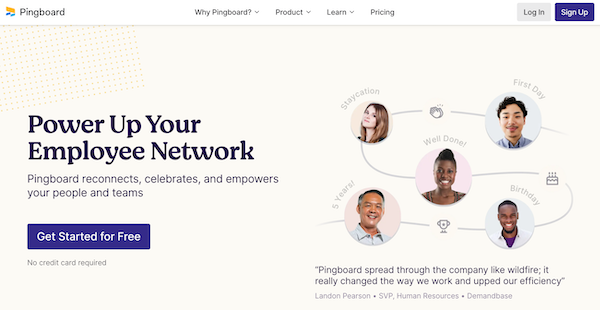
Pingboard is an HR software that enables you to promote employee networking and team connections by allowing them to learn more about each other. It provides an org chart that can help new employees determine who they will be working with and what their role will be.
It is also a useful tool that helps employees share who they are, what they do, responsibilities, hobbies, interests, skills, background, contact info, and more. The interactive org chart also serves as a searchable photo directory to help employees work more efficiently and increase their collaboration.
Through the employee profiles, Pingboard allows you to get to know each team member according to their skills and interests, which helps in promoting team cohesion. This platform also provides an employee directory so that you can identify relevant coworkers for your process.
Pingboard enables you to build better team relationships by providing tools that you can use to celebrate your members. You can invite them to take part in peer recognition to promote a positive work environment. Additionally, you can also celebrate employee milestones, such as birthdays and work anniversaries.
Pingboard also offers peer-to-peer recognition tools that let employees call out coworkers for a job well done. This helps managers see what type of work other employees are up to and prepare accurate performance reports.
Show MoreOverview of Pingboard Benefits
Onboarding Tools
Pingboard offers onboarding tools that you can use to help your new employees learn more about your company at a glance. The org chart assists them in identifying their role within your company, their teams, and the overall function of their department. This platform also enables you to customize their onboarding documents to show first-day info to help lessen their anxiety about joining the company.
Employee Profiles
Pingboard enables you to get to know your employees and team members through profiles that offer information like their skills and interests. These profiles can then be used to play the Who’s Who game, which helps your coworkers get to know their teammates. You can also add fun facts to your profile to further facilitate the networking process.
Team Connection
Pingboard helps you improve team connection by inviting you to take part in a workplace culture that is built on positive recognition and employee celebration. Through the peer recognition tool, your team can leave genuine feedback to each other so that they can improve and build self-confidence in their skills. This platform also enables you to celebrate birthdays, work anniversaries, and first-days.
In addition, Pingboard offers a Who’s Who game for your company, enabling employees to learn names, roles, and faces of their colleagues.
Integrations
Pingboard provides integrations to help you achieve efficiency in your workflow. Integrations with ADP, Okta, and G Suite helps in data management. Meanwhile, slack integration helps in providing real-time team updates and distributing peer recognition. For security, you can take advantage of this platform’s integrations with Okta, OneLogin, and other security software.
Shareable calendar
Pingboard also offers a shareable calendar that lets you keep track if yourcoworkers are working from home, out sick, or out of the office. Employees can also use this tool to request time off. This way, managers can easily pull reports on total PTO.
Show MoreOverview of Pingboard Features
- Employee Profiles
- Org Chart
- Employee Directory
- Away Message
- Peer Recognition
- Who’s Who Quiz
- Employee Milestones
- Integrations
What Problems Will Pingboard Solve?
Problem #1: Being part of a large team
If you’re walking into a meeting and you need to know everyone’s name, role, and a little about them, you can quickly search and browse Pingboard for those answers.
Problem #2: The work from home setting makes it hard for team members
When you are onboarding someone, especially now when a lot of people are working from home, it’s hard for them to understand who works for who, who does what, even simply the name of their coworkers. If you give someone access to an org chart made by Pingboard before they start it’s easy for them see the hierarchy of their new company. They can see the various teams across the company, they can search for roles that they’ll most likely work with so they know more about future coworkers. This helps speed up employees’ onboarding experience and helps them feel more welcome.
Problem #3: Creating and sustaining a work culture that is inclusive can be challenging for remote teams.
When people are working from home, it’s hard for them to stay connected to coworkers and the company direction. With Pingboard employees can see projects that people are excelling in with peer to peer recognition. They can see what roles are being hired for with Pingboard’s hiring flag in the interactive org chart. They can see birthdays, promotions, upcoming coworkers vacations. Employees can also feel more connected to coworkers by going to their profile and hitting the Connections button. This brings up all of the coworkers who share skills, interests, hobbies, and past experience with
Awards & Quality Certificates


Pingboard Position In Our Categories
Because companies have distinct business wants, it is only reasonable that they avoid adopting an all-encompassing, ideal software. Still, it is difficult to find such application even among recognizable software products. The best step to do would be to take note of the varied important factors which need research such as key features, plans, skill competence of staff members, business size, etc. After which, you must perform your product research systematically. Go over these Pingboard evaluations and explore each of the software products in your list more closely. Such all-encompassing product research ensure you avoid ill-fitting apps and choose the one which offers all the function your company requires in sustaining growth.
Position of Pingboard in our main categories:
TOP
200
Pingboard is one of the top 200 HR Management Software products
If you are considering Pingboard it may also be beneficial to check out other subcategories of HR Management Software gathered in our base of SaaS software reviews.
Since each organization has specific business wants, it is sensible for them to abstain from searching for a one-size-fits-all faultless software application. Needless to say, it would be futile to try to find such an app even among market-leading software applications. The clever thing to do would be to catalog the various important aspects that require consideration such as main features, finances, skill levels of workers, company size etc. Then, you should do your research thoroughly. Read some Pingboard HR Management Software reviews and investigate each of the other systems in your shortlist in detail. Such in-depth homework can make certain you discard ill-fitting applications and select the system that presents all the aspects you require for business success.
How Much Does Pingboard Cost?
Pingboard Pricing Plans:
Free Trial
Team
$123.75/month
Company
$248.75/month
What are Pingboard pricing details?
Pingboard Pricing Plans:
Free Trial
Team
$123.75/month
Company
$248.75/month
Pingboard offers two enterprise pricing packages to choose from:
Team – $123.75/month
- Up to 50 users
- Directory and profiles
- Org charts
- Plan and collaborate
- Peer recognition
- Who’s who quiz
- Who’s out
- Calendar
- Mobile apps
- Sync employee data
- Share the org chart
- Reports
- Integrate with Slack
Company – $248.75/month
- Up to 100 users (add more for $1.25/ea.)
- All of Team plan features
- Invite your whole company
- Advanced syncing
- API
User Satisfaction
Positive Social Media Mentions
26
Negative Social Media Mentions
1
We are aware that when you make a decision to get a HR Management Software it’s vital not only to see how experts score it in their reviews, but also to check if the actual users and businesses that purchased it are genuinely content with the product. That’s why we’ve devised our behavior-based Customer Satisfaction Algorithm™ that collects customer reviews, comments and Pingboard reviews across a wide array of social media sites. The information is then displayed in a simple to digest form revealing how many customers had positive and negative experience with Pingboard. With that information available you should be prepared to make an informed business decision that you won’t regret.
Video
Technical details
Devices Supported
- Web-based
Deployment
- Cloud Hosted
Language Support
- English
Pricing Model
- Free
- Monthly payment
- Annual Subscription
Customer Types
- Small Business
- Large Enterprises
- Medium Business
- Freelancers
What Support Does This Vendor Offer?
- phone
- live support
- training
- tickets
What integrations are available for Pingboard?
Pingboard supports integration with the following applications:
- Microsoft Azure Active Directory
- ADP
- BambooHR
- G Suite / Google Apps
- Namely
- Okta
- OneLogin
- Slack
- Automatic File Imports (SFTP)
- Justworks
- Gusto
- TriNet
- Zenefits

Pingboard
is waiting for
your first review.

Write your own review of this product
ADD A REVIEWMore reviews from 0 actual users:


Join a community of 7,369 SaaS experts
Thank you for the time you take to leave a quick review of this software. Our community and review base is constantly developing because of experts like you, who are willing to share their experience and knowledge with others to help them make more informed buying decisions.
Sign in with LinkedIn
Why we require LinkedIn?
- Show the community that you're an actual user.
- We will only show your name and profile image in your review.
- You can still post your review anonymously.
OR
Sign in with company emailSign in with company email
Popular Pingboard Alternatives


Top Competitors To Pingboard By Price
Product name:
Price:


Trending HR Management Software Reviews


Pingboard Comparisons
Product name:





Page last modified



 Why is FinancesOnline free?