
- Home
- Project Management Software
- SaaSJet SLA Time and Report

SaaSJet SLA Time and Report Review



What is SaaSJet SLA Time and Report?
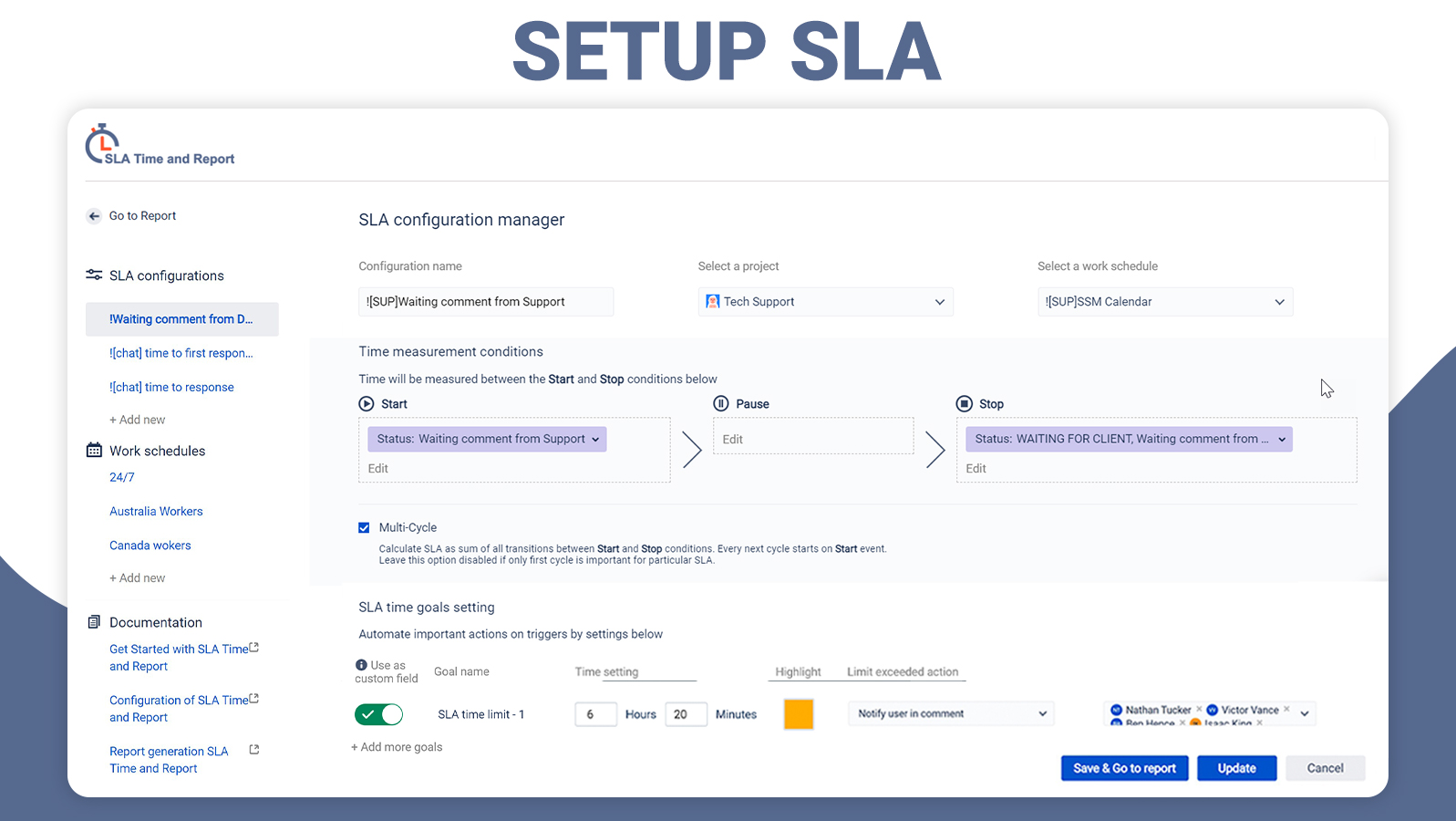
SaaSJet SLA Time and Report is a project management tool used in conjunction with Jira products like Jira Core and Jira Service Management. It’s an add-on that allows users to customize the SLA timers on their Jira issues; allowing them to specify SLA with start/stop/pause conditions, set multi-triggers for escalations, and add custom fields among others.
The tool also automatically generates reports on the SLA issues it tracks. Furthermore, you can add custom fields to export data to Confluence or export the SLA data as CSV and XLSX files. SLA Time Reports can be displayed in tabular form or in graphical chart view which comes in two variants: Pie Chart and Line Graph. Moreover, reports can be easily shared to external dashboards like Klipfolio by using the JSON URL provided as a source.
Show MoreOverview of SaaSJet SLA Time and Report Benefits
Flexible and Simple SLA Conditions
Knowledge of the JQL function is not necessary for setting SLA conditions because the software allows you to use issue fields for different criteria like status, priority, assignee, due date, comment, and issue type to accomplish the same task. You can also start, stop, or pause the conditions at any time.
Automated Escalation
The platform allows you to set time limits and goals for your SLA and choose which actions, such as status change, priority change, and notification, to automatically trigger when they overdue. This removes the need to use any automation rules for turning on triggered actions.
Graphic Charts
SLA Time and Report provides graphic chart tools to make reports and insights easier to understand and more engaging. There are two kinds of chart reports, namely Pie Chart for SLA in progress, met, or exceeded and Line Graphs for SLA met and exceeded. The reports can be shared with external clip builders like Geckoboard and Klipfolio simply by copying the JSON URL from the charts and pasting it into them.
Jira Integration
SLA Time and Report works as an add-on for Jira Software, Jira Core, and Service Management and extends their functionality to set up SLA for all project types. It can monitor SLA time for tickets, export SLA Data as CSV or XLSX files, create multiple calendars, and more.
Show MoreOverview of SaaSJet SLA Time and Report Features
- Time to SLA Report
- Flexible SLA Conditions
- Graphs View
- Custom Fields
- Jira Integration
- Issue View Tab
- Overdue Issues Automated Action
- JSON URL for External Clip Builders
Awards & Quality Certificates


SaaSJet SLA Time and Report Position In Our Categories
Knowing that businesses have particular business requirements, it is only rational they steer clear of buying a one-size-fits-all, “perfect” system. Having said that, it is nearly futile to find such application even among popular software solutions. The right step to do is to jot down the numerous vital factors which demand careful thought including major features, price plans, skill ability of the users, organizational size, etc. Next, you should do the research systematically. Go over these SaaSJet SLA Time and Report reviews and look over the other software solutions in your shortlist more closely. Such well-rounded product investigation ascertains you weed out unsuitable apps and choose the one that has all the benefits your business requires for success.
Position of SaaSJet SLA Time and Report in our main categories:
TOP
200
SaaSJet SLA Time and Report is one of the top 200 Project Management Software products
If you are interested in SaaSJet SLA Time and Report it may also be beneficial to investigate other subcategories of Project Management Software listed in our database of SaaS software reviews.
Each company has different needs and requires a system that can be personalized for their size, kind of workers and customers, and the specific industry they are in. For these reasons, no software can proffer perfect tools off-the-shelf. When you look for a software product, first be sure what you want it for. Read some SaaSJet SLA Time and Report Project Management Software reviews and ask yourself do you want basic tools or do you want advanced tools? Are there any industry-specific features that you are searching for? Find the answers to these queries to assist your search. There are lots of factors that you need to reflect on and these include your budget, particular business needs, your company size, integration needs etc. Take your time, try out a few free trials, and finally select the platform that provides all that you need to improve your company efficiency and productivity.
How Much Does SaaSJet SLA Time and Report Cost?
SaaSJet SLA Time and Report Pricing Plans:
Free Trial
Quote-based Plan
Contact vendor
What are SaaSJet SLA Time and Report pricing details?
SaaSJet SLA Time and Report Pricing Plans:
Free Trial
Quote-based Plan
Contact vendor
SaaSJet SLA Time and Report SMB and enterprise pricing details are available only upon request. Kindly contact the vendor for more information.
User Satisfaction
Positive Social Media Mentions
18
Negative Social Media Mentions
0
We realize that when you decide to get a Project Management Software it’s crucial not only to find out how professionals evaluate it in their reviews, but also to find out if the actual people and companies that purchased this software are actually happy with the service. Because of that need we’ve devised our behavior-based Customer Satisfaction Algorithm™ that gathers customer reviews, comments and SaaSJet SLA Time and Report reviews across a broad array of social media sites. The information is then presented in a simple to digest format showing how many people had positive and negative experience with SaaSJet SLA Time and Report. With that information at hand you should be equipped to make an informed business choice that you won’t regret.
Video
Screenshots
Technical details
Devices Supported
- Web-based
Deployment
- Cloud Hosted
Language Support
- English
Pricing Model
- Quote-based
Customer Types
- Small Business
- Large Enterprises
- Medium Business
What Support Does This Vendor Offer?
- phone
- live support
- training
- tickets
What integrations are available for SaaSJet SLA Time and Report?
SLA Time and Report seamlessly integrate with some of Jira applications including:
- Jira Software
- Jira Core
- Jira Service Management
SaaSJet SLA Time and Report User Reviews
SaaSJet SLA Time and Report average rating:
5/5
Overall impression
5/5
Customer Support
4/5
Value for Money
5/5
Ease of Use
Write your own review of this product
ADD A REVIEWMore reviews from 1 actual users:
Sort by:
Latest
- Latest
- Most useful
- Most positive
- Most negative
This was exactly what we were looking for!
Read full review >
5/5
Overall impression
5/5
Customer Support
4/5
Value for Money
4/5
Ease of Use
Published on: 26.07.2021
Company Size: 11-50 Employees
Industry: Telecommunications
PROS: We set SLA both for tracking agreements between our company and customers and for internal use. It has improved our team productivity.
CONS: It takes time to figure out the configuration. But the support responded quickly and did everything for delivering solution to our request


Join a community of 7,369 SaaS experts
Thank you for the time you take to leave a quick review of this software. Our community and review base is constantly developing because of experts like you, who are willing to share their experience and knowledge with others to help them make more informed buying decisions.
Sign in with LinkedIn
Why we require LinkedIn?
- Show the community that you're an actual user.
- We will only show your name and profile image in your review.
- You can still post your review anonymously.
OR
Sign in with company emailSign in with company email
Popular SaaSJet SLA Time and Report Alternatives




Top Competitors To SaaSJet SLA Time and Report By Price
Product name:
Price:





Trending Project Management Software Reviews




SaaSJet SLA Time and Report Comparisons
Product name:



SaaSJet SLA Time and Report user reviews
This was exactly what we were looking for!
Read full review >
5/5
Overall impression
5/5
Customer Support
4/5
Value for Money
4/5
Ease of Use
Published on: 26.07.2021
Company Size: 11-50 Employees
Industry: Telecommunications

Page last modified



Did you find this review useful?
Yes
No
Thank you for your feedback
How can we make this page better?
Unsure about this software?
FIND ALTERNATIVES
 Why is FinancesOnline free?