
- Home
- Project Management Software
- Spreadsheet.com

Spreadsheet.com Review



What is Spreadsheet.com?
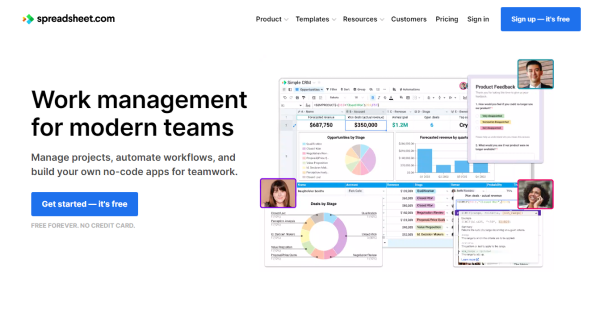
Spreadsheet.com is a complete work management platform similar to the popular spreadsheet, but with the added advanced capabilities of the database, codeless automation, project management, integrations, real-time updates, and more. You can use it to create no-code solutions for your teams, automate various operations, and manage projects.
Spreadsheet.com provides you with fresh ways to work that are seamlessly integrated into your spreadsheets, including traditional Sheet views, Kanban boards, Gantt charts, embeddable forms, and calendars. Utilize more than 25 unique data types to go beyond conventional spreadsheets. This includes select, multi-option dropdown menus, users, attachments stored inside cells, users, and icon sets.
Use the same familiar features, functions, and syntax you already know from Excel and Google Sheets to build flexible and powerful solutions; you also don’t have to start from scratch since there are over 150 templates available for content planning, applicant tracking, and more.
Show MoreOverview of Spreadsheet.com Benefits
Advanced Sheet Views
With Spreadsheet.com, you can construct anything from simple free-form spreadsheets to relational database tables. You may select from more than 25 different data types, including multi-select, email, rating, phone, and more, and then sort, filter, and group your data to build customized views of it. Drag and drop files into Attachment cells with interactive thumbnails and document previews to manage documents directly in your spreadsheets.
No-code Automation
Spreadsheet.com Automation allows you to visually build workflows without writing any code to automate tedious tasks and connect to other business applications. To get started right away, choose from more than 100 automation recipes that are ready to use, or create your own from scratch. Every automation begins with a trigger and can carry out a wide range of operations, such as sending emails, adding or changing rows, sending personalized MS Teams or Slack messages, or even calling a webhook.
Real-time Collaboration
Every modification is instantly synced with everyone and automatically saved. Message channels facilitate efficient and enjoyable teamwork. To collaborate seamlessly across platforms, users can employ the native mobile apps available or integrate Spreadsheet.com with other communication systems. You may also check the version history to see who made each modification and when. You can quickly browse and restore an earlier version, or you can just copy and paste old data.
Show MoreOverview of Spreadsheet.com Features
- Sheet Views
- Automation
- Calendar Views
- Gantt Chart Views
- Kanban Views
- Related Rows
- Form Views
- Integrations
Awards & Quality Certificates

Spreadsheet.com Position In Our Categories
Knowing that companies have their own business-related wants, it is only practical that they steer clear of purchasing an all-encompassing, “perfect” solution. Nonetheless, it would be hard to chance on such an app even among recognizable software products. The logical thing to undertake should be to set down the varied important aspects that call for a careful thought such as critical features, plans, technical skill competence of staff, organizational size, etc. Thereafter, you must conduct your research systematically. Go over these Spreadsheet.com review articles and look over each of the solutions in your list more closely. Such detailed product research can make sure you weed out ill-fitting apps and pay for the one that provides all the aspects your business requires.
Position of Spreadsheet.com in our main categories:
TOP
100
Spreadsheet.com is one of the top 100 Project Management Software products
If you are considering Spreadsheet.com it could also be sensible to investigate other subcategories of Project Management Software listed in our base of SaaS software reviews.
It is important to realize that virtually no software in the Project Management Software category is going to be an ideal solution that can meet all the needs of various business types, sizes and industries. It may be a good idea to read a few Spreadsheet.com Project Management Software reviews first as certain solutions may perform well exclusively in a very small set of applications or be created with a really specific industry in mind. Others can function with a goal of being simple and intuitive and as a result lack complicated functionalities needed by more experienced users. You can also come across services that support a wide group of customers and offer a complex feature set, but this in most cases comes at a higher cost of such a service. Be certain that you're aware of your needs so that you buy a software that offers all the functionalities you search for.
How Much Does Spreadsheet.com Cost?
Spreadsheet.com Pricing Plans:
Free Trial
Free Forever
Free
Standard
$9/creator/month
Premium
$22/creator/month
Enterprise
Contact vendor
What are Spreadsheet.com pricing details?
Spreadsheet.com Pricing Plans:
Free Trial
Free Forever
Free
Standard
$9/creator/month
Premium
$22/creator/month
Enterprise
Contact vendor
Spreadsheet.com is available on various enterprise pricing plans, from Free Forever to a custom Enterprise solution. For premium versions, the vendor only charges for users who can create spreadsheets.
Free Forever
- Unlimited workbooks
- 2,000 rows per workbook
- 3 GB of attachment storage space per workbook
- Sheet, Kanban, Calendar, and Form views
- Visual automation editor with conditional logic
- 200 automation actions per month
Standard – $9 per creator/month
- Includes all of Free +
- 10,000 rows per workbook
- 6 GB of attachment storage space per workbook
- 1 year of version history
- Gantt views with dependencies
- Advanced calendar features
- 10,000 automation actions per month
Premium – $22 per creator/month
- Includes all of Standard +
- 100,000 rows per workbook
- 30 GB of attachment storage space per workbook
- 2 years of version history
- Private and locked views
- Custom branded forms
- 100,000 automation actions per month
- Domain-restricted sharing
Enterprise – By quote
- Includes all of Premium, plus
- 200,000+ rows per workbook
- Unlimited attachment storage space per workbook
- Unlimited version history
- Unlimited automation
- Unlimited workspaces
- Dedicated customer success manager
User Satisfaction
Positive Social Media Mentions
44
Negative Social Media Mentions
8
We realize that when you decide to purchase a Project Management Software it’s important not only to find out how experts score it in their reviews, but also to check if the real people and businesses that bought this software are genuinely content with the service. That’s why we’ve devised our behavior-based Customer Satisfaction Algorithm™ that gathers customer reviews, comments and Spreadsheet.com reviews across a vast array of social media sites. The data is then displayed in a simple to understand way showing how many customers had positive and negative experience with Spreadsheet.com. With that information at hand you should be prepared to make an informed business choice that you won’t regret.
Video
Technical details
Devices Supported
- Web-based
Deployment
- Cloud Hosted
Language Support
- English
Pricing Model
- Free
- Monthly payment
- Quote-based
Customer Types
- Small Business
- Large Enterprises
- Medium Business
- Freelancers
What Support Does This Vendor Offer?
- phone
- live support
- training
- tickets
What integrations are available for Spreadsheet.com?
Spreadsheet.com features built-in automation that lets you seamlessly integrate the platform with the other tools you use, such as:
- Slack
- MS Teams
- Gmail
- Google Calendar
- Gogle Sheets
- Google Forms
- Salesforce
- QuickBooks
- Coda
- Notion
- Jira Software
- Zendesk
- twilio
- Evernotes
- Mailchimp

Spreadsheet.com
is waiting for
your first review.

Write your own review of this product
ADD A REVIEWMore reviews from 0 actual users:


Join a community of 7,369 SaaS experts
Thank you for the time you take to leave a quick review of this software. Our community and review base is constantly developing because of experts like you, who are willing to share their experience and knowledge with others to help them make more informed buying decisions.
Sign in with LinkedIn
Why we require LinkedIn?
- Show the community that you're an actual user.
- We will only show your name and profile image in your review.
- You can still post your review anonymously.
OR
Sign in with company emailSign in with company email
Popular Spreadsheet.com Alternatives


Top Competitors To Spreadsheet.com By Price
Product name:
Price:

By quote

By quote



Trending Project Management Software Reviews


Spreadsheet.com Comparisons
Product name:









Page last modified



Did you find this review useful?
Yes
No
Thank you for your feedback
How can we make this page better?
Unsure about this software?
FIND ALTERNATIVES
 Why is FinancesOnline free?